
RugWard Pay
Webhook 与签名验证
在每次账单状态变化时接收已签名的 HTTPS 通知,用 curl、Node.js、Python 或 PHP 验证签名,并安全处理重试与重复事件。
Webhook 的工作原理#
当账单状态发生变化时,RugWard 会向你的端点发送一个带 JSON 正文的 POST 请求。每个请求都使用你的签名密钥(signing secret)签名,因此你可以证明它来自 RugWard 且未被篡改。
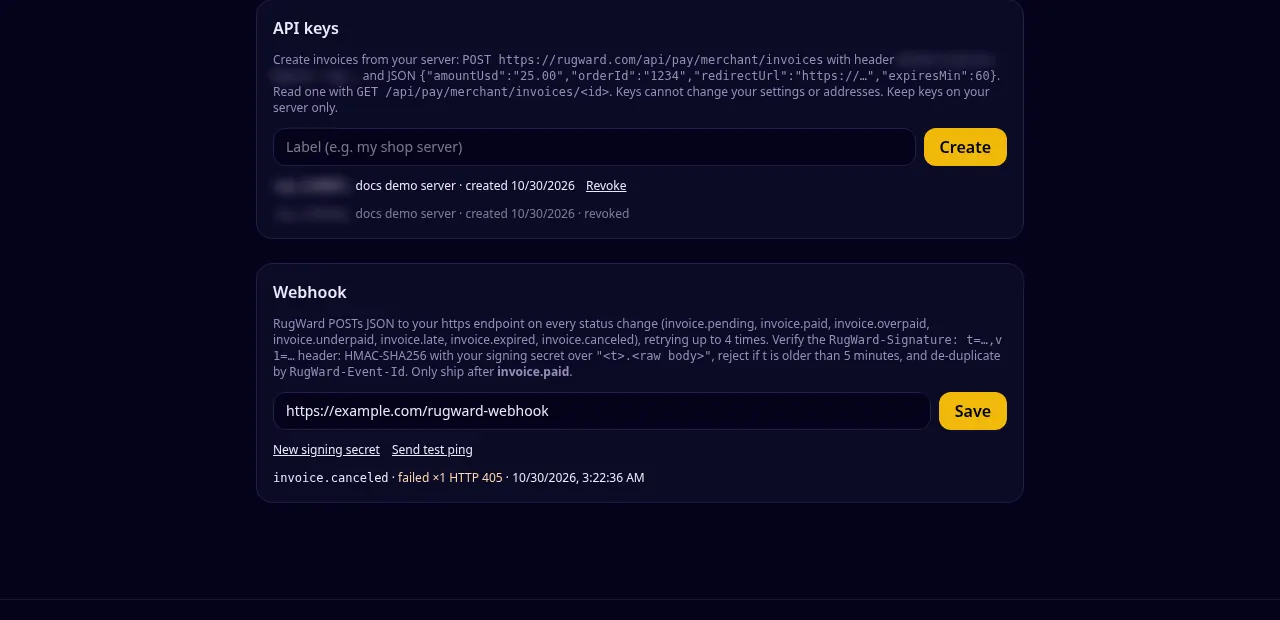
设置#
- 在控制台的 Webhook 中填写你的端点,然后点击 Save。
- 签名密钥(
whsec_后跟 40 个字符)只显示一次。请将其保存在服务器上,与 API 密钥放在一起。 - 点击 Send test ping。控制台会显示你的端点返回的 HTTP 状态码。
- 该区域下方的投递日志显示每个事件、其结果和尝试次数。
端点规则:
- 仅限
https://,使用标准端口(不能用:8443),最多 500 个字符; - 必须是公网主机名:IP 地址、
localhost和私有网络会被拒绝; - 在 10 秒内以任意 2xx 状态码响应。不跟随重定向:3xx 响应视为失败。
New signing secret 会立即替换密钥;请立刻部署新密钥(用旧密钥生成的签名会立即失效)。保存空 URL 会关闭 Webhook。
事件#
| 事件 | 发送时机 |
|---|---|
invoice.pending | 已发现付款,正在等待确认或剩余金额 |
invoice.paid | 已全额付款并确认:发货 |
invoice.overpaid | 付款超出 1% 以上:发货 |
invoice.underpaid | 汇率锁定结束时已确认金额不足 |
invoice.late | 付款在过期后才到达 |
invoice.expired | 过期且未付款 |
invoice.canceled | 你已取消该账单 |
ping | 控制台中的 Send test ping 按钮 |
每个事件对每张账单最多触发一次。测试账单从不发送 Webhook。
请求#
Webhook request (what your endpoint receives)
POST /rugward-webhook HTTP/1.1
Host: shop.example
Content-Type: application/json
User-Agent: RugWard-Pay-Webhook/1.0
RugWard-Event-Id: Zx3kQ8pL2mN7vR1tY5wB9c:paid
RugWard-Event: invoice.paid
RugWard-Signature: t=1793324105,v1=5f0c3d0e8b1a…(64 hex characters)
Body: invoice.paid
{
  "id": "Zx3kQ8pL2mN7vR1tY5wB9c:paid",
  "type": "invoice.paid",
  "created": 1793324100,
  "data": {
    "invoice": {
      "id": "Zx3kQ8pL2mN7vR1tY5wB9c",
      "status": "paid",
      "amountUsd": "25.00",
      "orderId": "1234",
      "description": "1 x T-shirt, size M",
      "redirectUrl": "https://shop.example/thanks?order=1234",
      "createdAt": 1793323282069,
      "expiresAt": 1793326882069,
      "paidAt": 1793324100512,
      "assets": ["BTC", "ETH-8453", "USDC-8453"],
      "test": false,
      "quotes": [{ "id": 4711, "asset": "USDC-8453", "amount": "25.000629", "rateUsd": "1", "address": "0x…", "expiresAt": 1793325082069 }],
      "payments": [{ "txid": "0x…", "asset": "USDC-8453", "amount": "24.875626", "confirmations": 30, "required": 30, "confirmed": true, "seenAt": 1793324012000, "explorer": "https://basescan.org/tx/0x…" }]
    }
  }
}
Body: test ping (dashboard button)
{ "id": "ping:1793324000000", "type": "ping", "created": 1793324000, "data": {} }id的格式为<invoice id>:<status>,也会出现在RugWard-Event-Id请求头中:用它来忽略重复事件。created以 Unix 秒为单位;data.invoice与GET /api/pay/merchant/invoices/:id返回的对象相同。
验证签名#
请求头形如 RugWard-Signature: t=1793324100,v1=5f2c…(64 个十六进制字符)。
- 按收到的原样读取原始请求正文(在任何 JSON 解析之前)。
- 计算
HMAC-SHA256(secret, t + "." + raw_body)并进行十六进制编码。 - 以恒定时间与
v1比较。 - 如果
t与你的时钟相差超过 5 分钟,拒绝该请求(防止重放)。 - 之后才解析 JSON。
先解析 JSON 再重新序列化会改变字节,导致签名不匹配。务必对原始正文校验签名。
Node.js (Express): verify, then process
import crypto from "node:crypto";
import express from "express";

const SECRET = process.env.RUGWARD_WEBHOOK_SECRET; // whsec_…
const app = express();

// Use the RAW body: the signature covers the exact bytes RugWard sent.
app.post("/rugward-webhook", express.raw({ type: "application/json" }), (req, res) => {
  const raw = req.body.toString("utf8");
  const m = /^t=(\d+),v1=([0-9a-f]{64})$/.exec(req.get("RugWard-Signature") || "");
  if (!m || Math.abs(Date.now() / 1000 - Number(m[1])) > 300) return res.sendStatus(400);
  const want = crypto.createHmac("sha256", SECRET).update(`${m[1]}.${raw}`).digest("hex");
  if (!crypto.timingSafeEqual(Buffer.from(want), Buffer.from(m[2]))) return res.sendStatus(400);

  const event = JSON.parse(raw);
  // De-duplicate: the same event id can arrive more than once.
  // if (alreadyProcessed(event.id)) return res.sendStatus(200);
  if (event.type === "invoice.paid" || event.type === "invoice.overpaid") {
    const inv = event.data.invoice;
    // markOrderPaid(inv.orderId, inv.id);  // ship only now
  }
  res.sendStatus(200); // any 2xx = delivered
});
app.listen(3000);
Python (Flask)
import hashlib, hmac, json, os, re, time
from flask import Flask, abort, request

SECRET = os.environ["RUGWARD_WEBHOOK_SECRET"].encode()  # whsec_…
app = Flask(__name__)

@app.post("/rugward-webhook")
def rugward_webhook():
    raw = request.get_data()  # raw bytes, exactly as sent
    m = re.fullmatch(r"t=(\d+),v1=([0-9a-f]{64})", request.headers.get("RugWard-Signature", ""))
    if not m or abs(time.time() - int(m.group(1))) > 300:
        abort(400)
    want = hmac.new(SECRET, m.group(1).encode() + b"." + raw, hashlib.sha256).hexdigest()
    if not hmac.compare_digest(want, m.group(2)):
        abort(400)
    event = json.loads(raw)
    if event["type"] in ("invoice.paid", "invoice.overpaid"):
        inv = event["data"]["invoice"]
        # mark_order_paid(inv["orderId"], inv["id"])  # de-duplicate on event["id"]
    return "", 200
PHP 8
<?php
$secret = getenv("RUGWARD_WEBHOOK_SECRET"); // whsec_…
$raw = file_get_contents("php://input");
$sig = $_SERVER["HTTP_RUGWARD_SIGNATURE"] ?? "";
if (!preg_match('/^t=(\d+),v1=([0-9a-f]{64})$/', $sig, $m) || abs(time() - (int)$m[1]) > 300) {
    http_response_code(400); exit;
}
$want = hash_hmac("sha256", $m[1] . "." . $raw, $secret);
if (!hash_equals($want, $m[2])) { http_response_code(400); exit; }

$event = json_decode($raw, true);
if (in_array($event["type"], ["invoice.paid", "invoice.overpaid"], true)) {
    $inv = $event["data"]["invoice"];
    // mark_order_paid($inv["orderId"], $inv["id"]); // de-duplicate on $event["id"]
}
http_response_code(200);
要手动测试你的端点,可以自己为正文签名:
Shell (openssl): compute a signature to test your endpoint
SECRET='whsec_…'            # your signing secret
BODY='{"id":"ping:1","type":"ping","created":1793324000,"data":{}}'
T=$(date +%s)
SIG=$(printf '%s.%s' "$T" "$BODY" | openssl dgst -sha256 -hmac "$SECRET" -hex | sed 's/^.* //')

curl -X POST https://shop.example/rugward-webhook \
  -H "Content-Type: application/json" \
  -H "RugWard-Event: ping" \
  -H "RugWard-Signature: t=$T,v1=$SIG" \
--data "$BODY"重试与重复#
如果你的端点超时或未返回 2xx,RugWard 会重试:总共最多 4 次尝试,分别在大约 30 秒、2 分钟和 8 分钟之后。之后该事件会在投递日志中标记为失败。因此你的处理程序应当:
- 快速返回 2xx,耗时的工作之后再做;
- 保持幂等:保存
RugWard-Event-Id,跳过已处理过的事件; - 不依赖顺序:如有疑问,用 API 重新读取账单。
Webhook 是快速信号,但不是唯一信号。如果你的服务器宕机过一段时间,请用 API 列出最近的账单并核对状态。
故障排查#
| 现象 | 可能原因 |
|---|---|
| "Webhook URL must be https:// with a public host name" | 使用了 IP 地址、自定义端口、http:// 或内部主机名 |
| ping 显示 HTTP 301/302/308 | 你的服务器做了重定向(例如 http→https,或缺少末尾斜杠);请使用最终 URL |
| ping 显示 405 | 该路由不接受 POST |
| 签名始终不匹配 | 正文在计算哈希前被解析或重新编码,使用了错误的密钥(在 New signing secret 之后),或服务器时钟不准 |
| 测试账单没有事件 | 正常:测试账单从不发送 Webhook |
最后更新: 2026年10月30日